
👤 How to Update Your Profile in SkySenders
⚙ Step 1: Open Settings
Go to the SkySenders App.
Click on “Settings” located in the bottom-left corner of the dashboard.
👥 Step 2: Navigate to Profile
Within the Settings menu, select “Profile”.
This section allows you to view and update your personal information, such as name, and other relevant details.
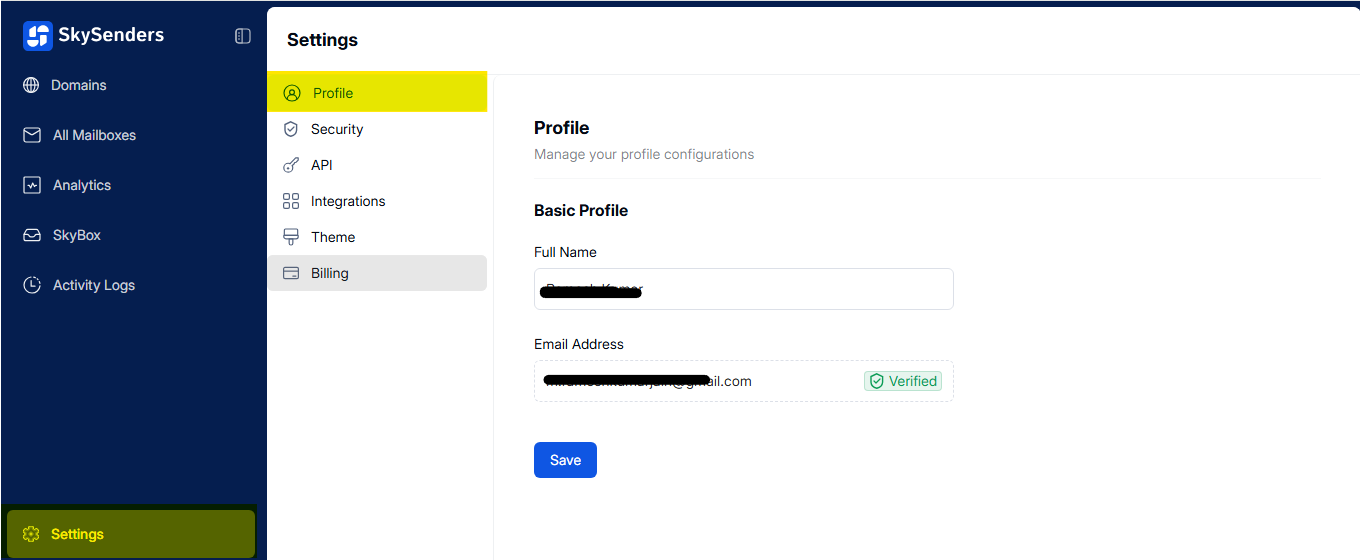
📝 Step 3: Edit Your Profile
Make the necessary changes to your profile information if needed.
You can update Name field,.
💾 Step 4: Save Changes
Once you're done editing, click on the “Save” button to apply the changes.
✅ Tip: Always double-check your contact details for accuracy before saving.