
⚙ Step 1: Open Settings
Launch the SkySenders App.
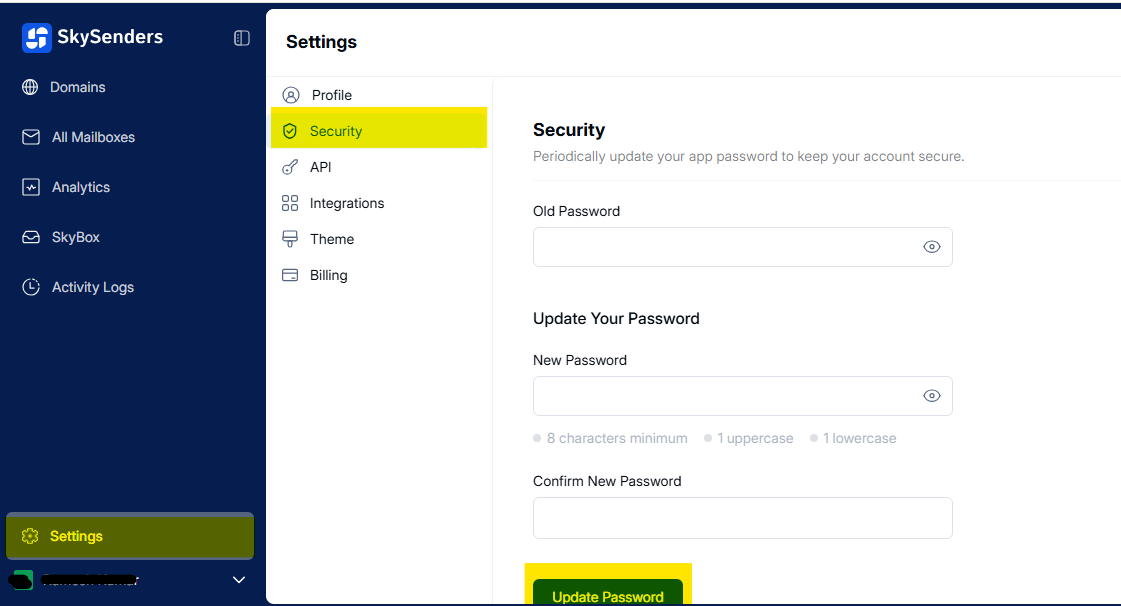
Click on “Settings” located in the bottom-left corner of the dashboard.
🔒 Step 2: Navigate to Security
From the Settings menu, select “Security”.
This section allows you to manage your account password and other security settings.
🛠 Step 3: Change Your Password
In the Security section, you'll find the password update form.
Enter the following:
Old Password
New Password
Confirm New Password
💾 Step 4: Save Changes
After entering your new password details, click “Update Password” to apply the changes.
✅ Tip: Use a strong, unique password to enhance account security.