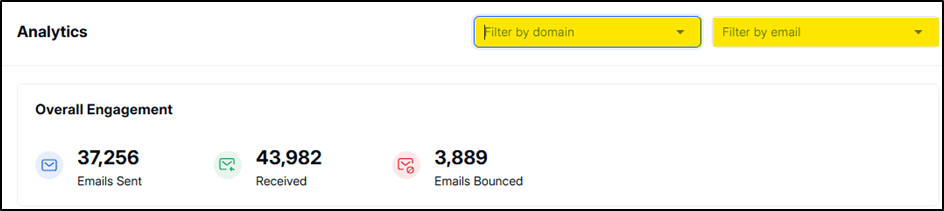
Email engagement provides a clear snapshot of how recipients are interacting with your emails. You can filter this data by Domain or Individual Email Accounts to analyze specific segments of your outreach.
It tracks the following key metrics:
📤 Emails Sent
The total number of emails successfully dispatched from your account.
📬 Replies
The number of responses received from recipients, indicating engagement and interest in your outreach.
🚫 Bounces
The number of emails that failed to reach the recipient due to invalid addresses, full inboxes, or other delivery issues.
💡 Tip: Use these metrics to evaluate the performance of your campaigns, identify potential issues, and optimize future email strategies.
Performance metrics offer a high-level view of your email health and deliverability, which directly impact your domain reputation and inbox success.

⚠ Important: A high bounce rate or low delivery rate can negatively impact your email domain’s reputation. Regular monitoring and maintenance (e.g., list cleaning, warming up domains) are recommended.
You can use the Month Filter to segment and view performance for a specific time period.
The engagement chart gives a visual bar graph of emails sent, replied, and bounced on each day.
Blue bars for Emails Sent
Green bars for Replies
Red bars for Bounces
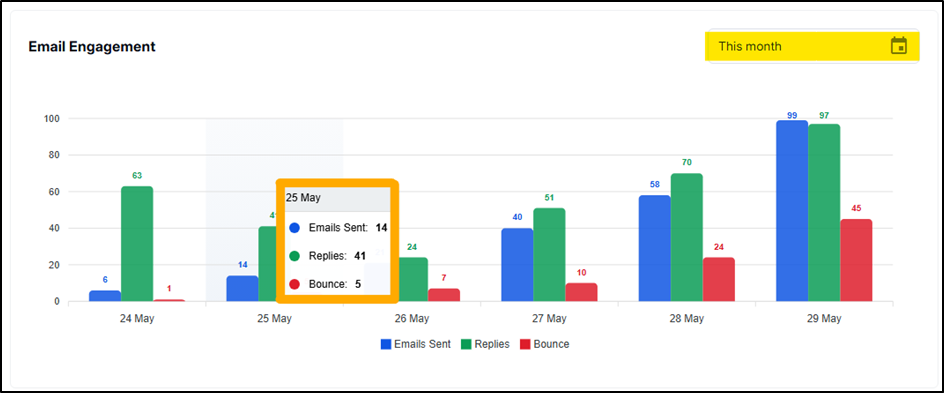
💡 Tip: Hover over any bar to see the exact numbers for that date (e.g., emails sent, replies, and bounces).
Identify patterns in user engagement over time.
Pinpoint days or campaigns with low performance to improve strategy.
Take proactive steps to boost deliverability and reduce bounce rates.
Make data-driven decisions for your email outreach strategy.
