
📤 Export Domain Mailboxes as CSV
Follow the steps below to export the domain as a CSV file from your SkySenders account.
🔐 Step 1: Login
Launch the SkySenders App.
🌐 Step 2: Select Domain
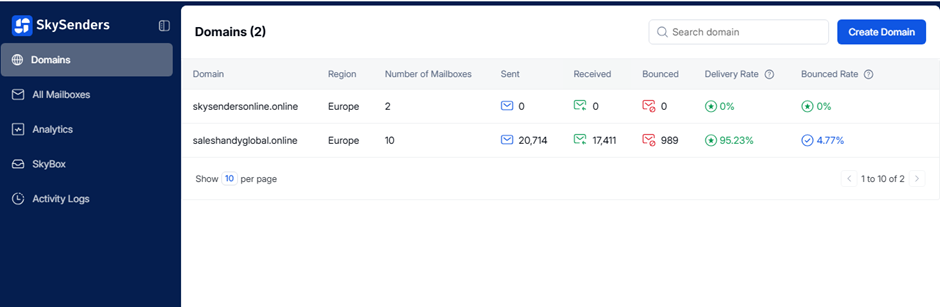
Click on "Domain" from the top-left menu.
All your purchased domains will be displayed.
📂 Step 3: Choose a Domain
Select the domain from which you want to export the CSV file.
📤 Step 4: Export CSV
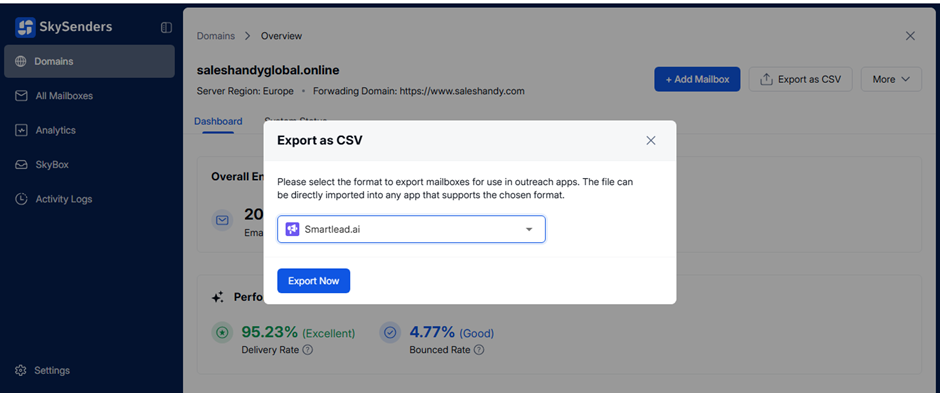
Click on the “Export CSV” option at the top-right corner.
Choose the format suitable for use in outreach apps from the dropdown.
Click on “Export Now”.
📁 Step 5: Download
Your CSV file will be downloaded automatically.
It will contain all the required mailbox details.